Most living rooms need a television, but few look good when the television runs the room. The problem is rarely the screen itself. It is the height, the distance, the glare, and the wall of black glass facing the front door. Get those four things right and the television becomes one piece of furniture among others, not the centre of attention. A good layout starts with how you actually watch: straight on for films, angled for casual viewing, or tucked to one side so conversation still works. This guide gives fifteen layouts for real rooms — small flats, long narrow rooms, open-plan spaces, and rooms with a fireplace — with viewing distances, mounting heights, and seating sizes you can measure before you move a single sofa. Use them to keep the screen comfortable to watch and easy to ignore when it is off. Measure your room first, because every distance and height below assumes a standard sofa seat height.
The Classic Opposite-Wall Layout
The classic layout puts the television on the longest wall and the main sofa directly opposite, centred on the screen. For a 55-inch television, leave 7 to 9 feet between screen and sofa; for a 65-inch screen, leave 8 to 10 feet, and for a 75-inch screen, leave 10 to 12 feet. Mount the centre of the screen 42 to 48 inches from the floor for a standard sofa, so your eyes meet the middle third of the screen when seated. Add a low console 6 to 12 inches wider than the television on each side to ground it visually. Avoid pushing the sofa against the back wall in a long room just to gain distance, as that kills conversation. Practical tip: mark the sofa position with painter’s tape and sit in it for an evening before fixing the mount, because a few inches changes neck comfort.
Corner Placement on an Angle
Corner placement suits square rooms and rooms where the longest wall is taken by windows or a fireplace. Angle the television at 30 to 45 degrees into the corner, on a corner stand or a full-motion wall mount, and angle the main sofa or a pair of chairs to face it without twisting. Keep at least 24 inches of clear walkway on each side of the seating, and leave 4 to 6 inches of ventilation behind the television. A 43- to 55-inch screen usually suits a corner best; larger screens can dominate a tight corner and force seating too close. Avoid placing the television so high in the corner that viewers tilt their heads back. Practical tip: use a swivel mount even on a stand, so one viewer can adjust the angle for daytime glare without moving furniture.
Fireplace and TV Side by Side
Putting the television beside, rather than above, the fireplace solves the two most common complaints: a sore neck and a screen that dwarfs the fire. Place the fireplace on the main wall and the television on the adjoining wall section or beside the chimney breast, angled slightly toward the sofa, with at least 12 inches of clearance from the firebox surround for heat. Keep the television centre at 42 to 48 inches high, and balance the fireplace side with shelving, art, or a tall plant so the wall does not look lopsided. This layout works well in rooms 14 feet wide or more. Avoid squeezing both onto a narrow breast, where neither gets proper viewing distance. Practical tip: run seating in an L shape, with the sofa facing the television and a chair facing the fireplace, so both features get used.
Low Console at Eye Level
A low, wide media console keeps the television at a natural eye level and gives the wall a calm, horizontal line. Choose a console 18 to 22 inches tall and at least as wide as the television, ideally 6 inches wider on each side, and place the television on a stand on top or wall-mounted 4 to 6 inches above the console. The screen centre should sit 42 to 48 inches from the floor, which suits most sofas with a seat height of 17 to 19 inches. A console of 60 to 72 inches wide suits a 55- to 65-inch television and holds a soundbar, console, and books without clutter. Avoid tall, narrow stands that push the screen up and make the wall look top-heavy. Practical tip: choose a console with closed doors or baskets for remotes and cables, so the area under the screen stays tidy when the television is off.
TV Inside a Cabinet With Doors
A cabinet with closing doors lets you hide the television completely when it is not in use, which instantly returns the room to a sitting room. Use a built-in or freestanding cabinet at least 4 inches wider than the television on each side, with 3 to 4 inches of ventilation space at the back and top, and doors that fold back fully or slide away. Pocket or bi-fold doors work best, because standard hinged doors block seating or art when open. Budget $800 to $3,000 for a good freestanding unit, or $2,000 to $6,000 for a built-in version. Avoid cabinets with solid backs and no airflow, as heat shortens television life. Practical tip: add a remote-control repeater or leave a small infrared gap, so you can change channels with the doors closed during music playback.
Bookshelves Flanking the Television
Flanking the television with matching bookshelves makes the screen one element in a larger wall composition instead of a lone black rectangle. Build or buy two shelf units 24 to 36 inches wide on each side of the television, with the television centred between them and its centre at 42 to 48 inches high. Keep shelf depth at 12 inches for books and 16 inches if the lower shelves hold baskets or a console. Fill shelves with roughly 60 percent books and objects and 40 percent empty space, so the wall feels curated rather than stuffed. Avoid lining up shelf heights exactly with the top of the television, which creates a harsh horizontal line. Practical tip: place a larger piece of art or a tall vase on one side only, to break the symmetry just enough that the wall feels lived in.
Swivel Mount for Open-Plan Rooms
A full-motion swivel mount lets one television serve a kitchen, dining, and seating area without dominating any of them. Fix a mount rated for at least 20 percent more than your television’s weight to a stud wall or a reinforced panel, and choose an arm that extends 18 to 28 inches from the wall and swivels at least 60 degrees each way. Park the television flat against the wall when not in use, and pull it out only for viewing, keeping at least 36 inches of walkway clear when extended. This suits 55- to 65-inch screens in open-plan rooms where seating faces two directions. Avoid mounting on a plasterboard wall with plugs alone, as the leverage of an extended arm will pull it loose. Practical tip: mark the parked and viewing positions with small floor dots for a week, to check the swivel does not block a doorway or dining chair.
L-Shaped Sectional Zoning
An L-shaped sectional naturally zones a television area in an open room, with one arm facing the screen and the other facing the room. Place the long arm of the sectional opposite the television, 8 to 10 feet away for a 65-inch screen, and let the short arm turn back into the room to define the seating zone without a wall. A sectional measuring roughly 100 by 65 inches suits a 14-by-16-foot room, while smaller rooms need a 84-by-60-inch version. Leave 30 to 36 inches behind the sectional for a walkway, and add a side table at the corner for lamps and drinks. Avoid pushing the sectional hard into a corner if it blocks the television angle for the short-arm seat. Practical tip: put the chaise on the side away from the main walkway, so traffic does not cut across viewers’ legs.
Two Zones: Conversation and Viewing
Two-zone layouts keep a living room social by giving conversation its own space, separate from the television corner. Arrange two armchairs and a small table facing each other near a window or fireplace for talking, and place the sofa and television in a second zone at least 6 feet away, angled so the two zones do not face each other directly. Use a rug under each zone — typically 5 by 8 feet for conversation and 8 by 10 feet for viewing — to mark the boundary without a wall. This works best in rooms 18 feet or longer, or in open-plan spaces. Avoid pointing every seat at the television, which turns the whole room into a cinema. Practical tip: use a low bookshelf or a console table as a soft divider between zones, keeping sight lines open while signalling that the spaces have different jobs.
Sliding Art Panel Over the Screen
A sliding art panel hides the television behind a large framed print, mirror, or fabric panel when it is off, and slides aside for viewing. Use a panel at least 4 inches wider and taller than the television, hung on a barn-door or bypass track rated for the panel weight, with 3 to 4 inches of clearance in front of the screen. A 65-inch television needs a panel roughly 62 by 38 inches, and the track needs wall space equal to twice the panel width if it slides to one side. Expect $300 to $1,200 for a ready-made track and panel, or $1,000 to $2,500 for a framed artwork version. Avoid heavy glass frames on a standard track, which can sag over time. Practical tip: choose art you genuinely like at full size, because it will be the room’s main artwork most of the day, not just a cover.
Television Set Into a Wall Alcove
Setting the television into an existing alcove or a shallow built-out niche frames it like a picture and stops it jutting into the room. The alcove should be at least 4 inches wider than the television on each side and 4 inches deeper than the television plus mount, typically 6 to 8 inches deep in total, with ventilation slots at the top and bottom. Line the back with a plain, matte finish to reduce reflections, and add a low shelf below for a soundbar. This suits rooms with chimney alcoves, hallway recesses, or a stud wall you can build out for $500 to $1,500. Avoid a tight, flush fit with no airflow, and avoid glossy tiles inside the alcove, which bounce light onto the screen. Practical tip: fit a small LED strip behind the television inside the niche, set to warm white, to soften the black rectangle when the screen is off.
Floating Console With Bias Lighting
A floating console with bias lighting makes the television wall feel lighter and reduces eye strain in a dark room. Fix a wall-hung console 16 to 20 inches below the television, leaving the floor clear, with the screen centre at 42 to 48 inches high and the console 6 to 12 inches wider than the screen on each side. Add a 6500K LED strip behind the television, running at 10 to 15 percent of the screen’s brightness, and hide cables in a paintable trunking channel or inside the wall. A floating console costs $200 to $900 ready-made, plus $20 to $50 for the light strip. Avoid a console so shallow that a soundbar overhangs the front edge. Practical tip: put the LED strip on a smart plug or remote dimmer, so you can switch it on without reaching behind the television each evening.
Gallery Wall That Absorbs the Screen
A gallery wall around the television breaks up the black rectangle by surrounding it with frames, so the eye reads the whole wall as art. Hang the television first at 42 to 48 inches centre height, then build frames around it, keeping 2 to 3 inches between the screen edge and the nearest frame and 3 to 5 inches between frames. Mix frame sizes from 8 by 10 inches up to 16 by 20 inches, with one larger piece to anchor a corner, and keep the palette to two or three frame finishes. This works best with a television 55 inches or smaller, so the art is not overwhelmed. Avoid reflective glass directly beside the screen, which catches glare. Practical tip: lay the whole arrangement on the floor first, photograph it, and tape paper templates to the wall before hammering a single nail.
Small-Room Wall Mount and Compact Seating
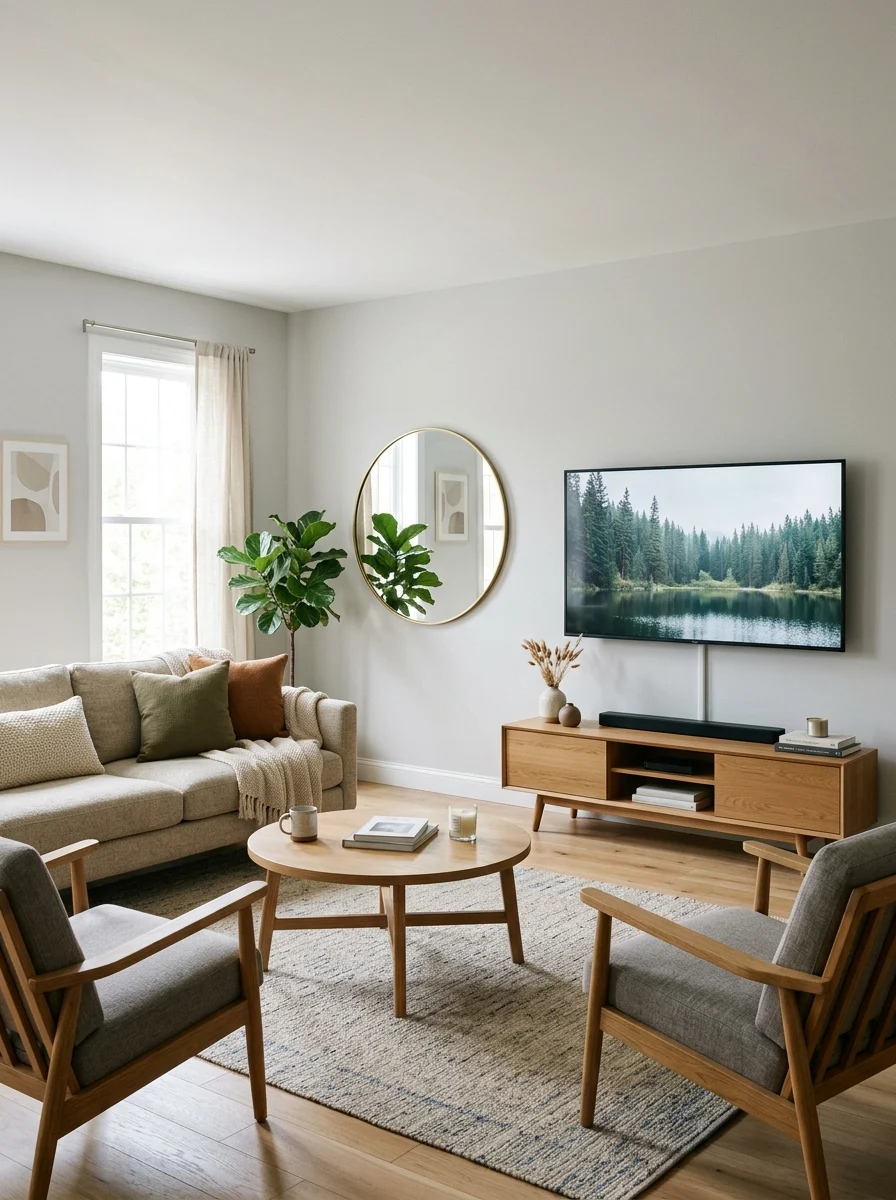
Small rooms work best when the television goes on the wall and the seating stays light, low, and movable. Wall-mount a 43- to 55-inch television with its centre at 40 to 44 inches high, which suits lower apartment sofas, and keep viewing distance at 5.5 to 7.5 feet for a 55-inch screen. Pair it with an armless sofa or loveseat 72 to 84 inches wide, a pair of light chairs, and a small round coffee table 30 to 36 inches across, leaving 30 inches of walkway around seating. Skip a bulky media unit and use two floating shelves for a soundbar and a few books. Avoid a television larger than the wall section it sits on, which makes the room feel smaller. Practical tip: choose a tilt mount, not a fixed one, so you can angle the screen down slightly and cut ceiling-light glare in a low room.
Room-Divider Console in Open Plan
A freestanding room-divider console lets a television face the seating area while its back defines a dining or work zone behind it. Use a console 60 to 72 inches wide and 32 to 36 inches tall, with finished panels on both sides, and place the television on a stand or a post mount fixed to the console. Anchor the seating side with a rug at least 8 by 10 feet, and keep 36 to 42 inches of walkway behind the console for the second zone. Add low storage, books, or a plant on the rear side so the back does not look unfinished. This suits open-plan rooms 20 feet or longer. Avoid a tall, solid divider, which blocks light and conversation. Practical tip: fix the console to the floor with discreet brackets or anti-tip straps, because a freestanding unit with a heavy screen on top can tip if leaned on.
Frequently Asked Questions
How high should a TV be mounted in a living room?
Mount the television so the centre of the screen sits 42 to 48 inches from the floor for a standard sofa, or 40 to 44 inches for a low apartment sofa. Your eyes should meet the middle third of the screen when seated, without tilting your head up or down. Above a fireplace, the screen usually ends up too high, so a side-by-side layout or a pull-down mount is more comfortable for regular viewing.
How far should the sofa be from the TV?
As a guide, allow 7 to 9 feet for a 55-inch television, 8 to 10 feet for a 65-inch television, and 10 to 12 feet for a 75-inch television. In a small room, a 43- to 55-inch screen at 5.5 to 7.5 feet works well. If you sit closer than the guide, text and fast movement can feel tiring; if you sit much further, small details and subtitles become hard to read.
How do I reduce glare on a living room TV?
Place the television perpendicular to windows rather than opposite them, so daylight does not reflect straight back at viewers. Use sheer curtains or blinds on the brightest window, choose a matte screen finish if buying new, and add bias lighting behind the television for evening viewing. A tilt or swivel mount also helps, because a small angle change often removes a reflection without moving any furniture.
Conclusion
A living room with a television does not have to look like a cinema, and it does not have to sacrifice conversation either. The layouts that work best share the same basics: the screen at eye level, seating at a comfortable distance, glare controlled, and cables and clutter out of sight. Whether you hide the screen behind art, flank it with bookshelves, angle it into a corner, or zone it inside an open-plan room, the goal is the same — a room that is pleasant to sit in when the television is off, and comfortable to watch when it is on. Measure your wall, your viewing distance, and your walkways first, then choose the layout that fits.